
Built on relationships.
Ready for what’s next.
McKee-Nix & Associates · Digital infrastructure
Decades of expertise.
A new way to connect.
Since 1971, McKee-Nix has connected manufacturers with the contractors and wholesalers who put their products to work.
The next chapter called for a more modern way to serve both sides of that relationship: help contractors access training, give the team tools to manage it, and make that work visible to manufacturer partners.
We built the digital infrastructure to connect those experiences.
For contractors,
an easier way in.
A new identity and training-led website give the business a clear, consistent presence. Contractors can find a class, book places for their crew, and receive the details they need to attend.
Manufacturer information and direct contact paths keep the wider business close at hand.

For the team,
a class ready to run.
A signup tells staff who is coming, what to prepare, and what needs collecting. Follow one crew booking to see how those details support the class—and become useful evidence afterward.
Know who’s coming—and what to prepare.
One company can book its crew, name each attendee, select kits, and choose how to pay. Those details are available to the team managing the class.
Illustrative workflow · Fictional data
Example Mechanical
Installation training · 3-hour class
- Places booked
- 3 people
- Kit order
- 2 kits
- Payment choice
- Cash / check at class
- AlexRegistered
- JordanRegistered
- TaylorRegistered
The crew names, kit order, and payment choice are available before anyone arrives.
- The system handles
- The booking contact receives a branded confirmation. New signups feed the team’s weekday email summary.
- The team decides
- Staff can review the crew, kit order, and balance before class.
A signup becomes something the team can act on.
Keep attendance separate from reservations.
Staff mark people present from a phone, track kit pickup, and record cash or check payments. After the class, they confirm attendance before closing it out.
Illustrative workflow · Fictional data
Example Mechanical
Installation training · 3-hour class
After staff finalize the class
- AlexPresent
- JordanPresent
- TaylorDid not attend
- Kit pickup
- 2 collected
- Payment record
- Check received
Three places were booked. Staff confirm two people attended.
- The system handles
- The workspace keeps the booking details alongside attendance and order records.
- The team decides
- Staff confirm who attended. Closing the class finalizes that record for reporting.
The system supports the work; staff confirm what actually happened.
Give partners a record of the work delivered.
When an administrator generates a manufacturer report, finalized classes contribute their attendance, company participation, and training hours. Open classes are excluded.
Illustrative workflow · Fictional data
Example Mechanical
Installation training · 3-hour class
This class, summarized
- Training attendance
- 2
- Participating company
- 1
- Attendee training hours
- 6
2 attendees × 3 scheduled hours = 6 attendee hours
Taylor’s reserved place does not count as attendance. The report describes recorded activity, not sales.
See a generated report- The system handles
- The report calculates activity from completed records and saves a snapshot.
- The team decides
- An administrator reviews the report and chooses when to export or share it.
Partners see recorded participation, with a clear distinction between bookings and attendance.
For manufacturers,
the work becomes visible.
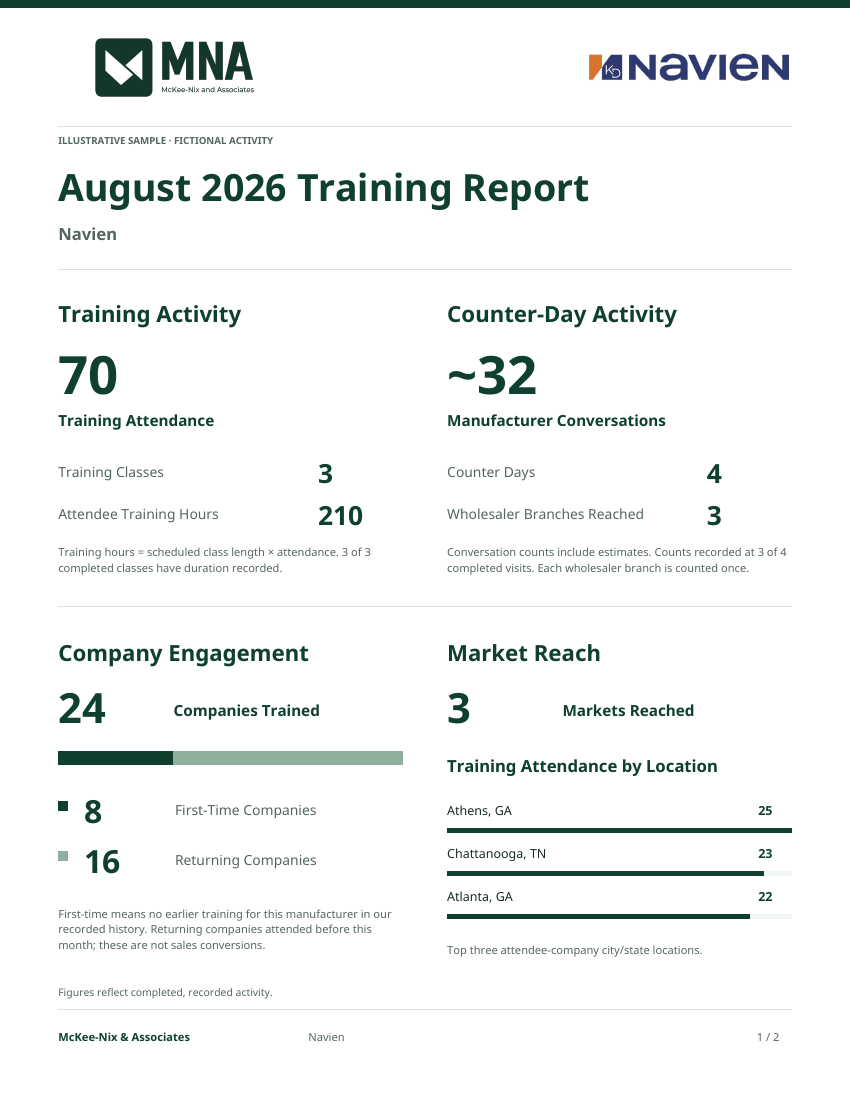
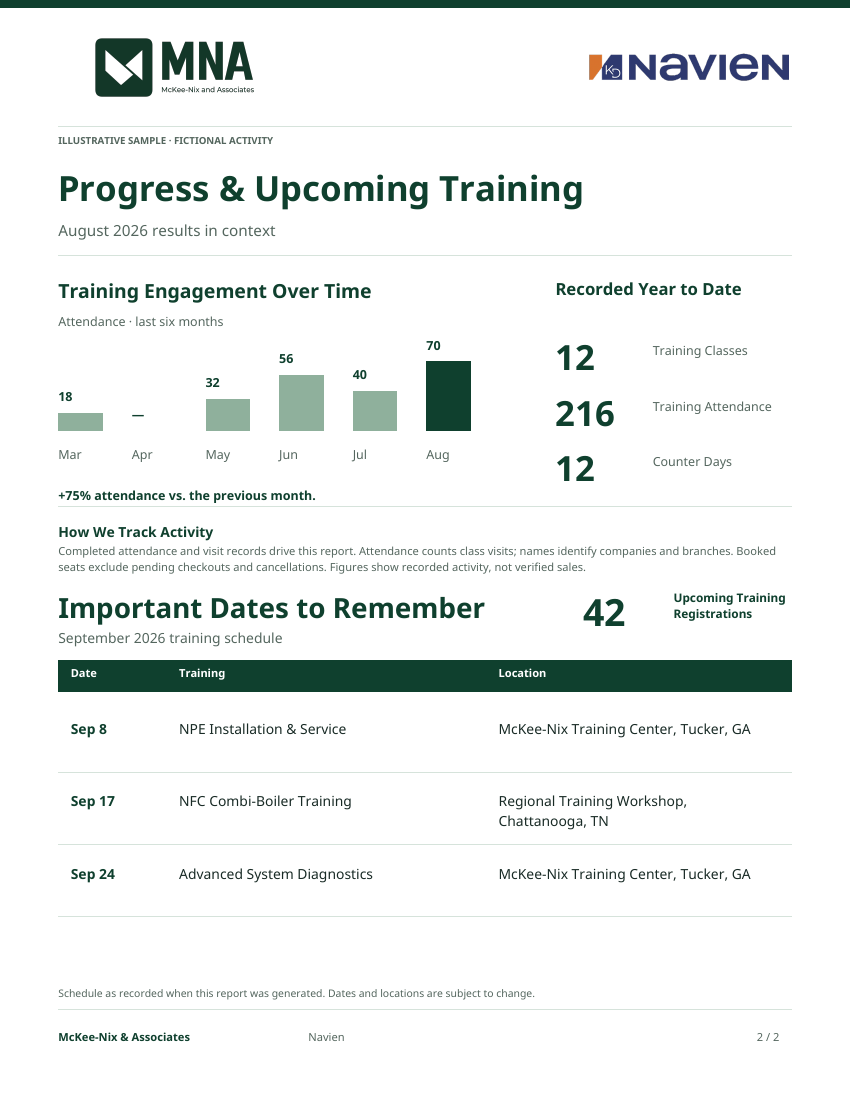
Training and field visits tell a larger story when they can be seen together. The reporting system turns completed records into a clear view of participation, company engagement, market reach, and upcoming training.
McKee-Nix can review that story, save a snapshot, and share it with a partner as an online report or PDF.
A report the system generates.
Actual output from the reporting code, using fictional activity. These figures are illustrative, not McKee-Nix business results.
The story is connected.
The details are here.
Explore the full project scope
An identity that holds together.
The MNA identity carries through the website, communications, reports, and phone workspace. The delivery includes editable vector masters, logo variants, symbols, image exports, favicons, and phone icons.
A website built around the work
The new website puts hands-on training and manufacturer representation at the center of the experience, with clear paths for contractors, wholesalers, and manufacturers.
- Training-led homepage and a dedicated manufacturer representation page.
- Searchable manufacturer directory, product categories, and direct links to represented brands.
- Georgia and Tennessee territory information, team profiles, company history, and contact paths.
- Phone navigation with direct Call, Find a rep, and Training actions.
Training discovery + registration
The public calendar connects the website to the class schedule. Registration supports an individual visitor or a company booking places for a team.
- Calendar and agenda views, with class details, venues, dates, and directions.
- Group bookings with named attendees and a company contact.
- Capacity checks, optional training kits, and free-class registration.
- Clear confirmation and recovery states when a request needs attention.
The staff workspace
Behind the public experience, the team has a private place to manage the training operation through the Minor Legend client portal.
- Create, draft, publish, update, and cancel classes.
- Manage dates, time zones, venues, capacity, visibility, and registrations.
- Search attendees, mark attendance on a phone, and undo a mark when needed.
- Close out completed classes and reopen them for corrections.
Booking, kits + payment records
The booking workflow carries the practical details staff need after a place is reserved.
- Training-kit orders and pickup tracking.
- Cash and check balances, receipts, and payment records.
- Cancellation and refund reconciliation.
- Card checkout has been prepared; payment-account activation and validation remain a separate launch step.
Communications that follow the booking
Branded email gives attendees confirmation and helps the team stay aware of new signups without a separate manual message for each one.
- Registration confirmation messages in the McKee-Nix identity.
- Consolidated weekday signup summaries for the team.
- Scheduled processing and durable retries for delivery failures.
Manufacturer reporting
Training activity becomes a record the team can review and share deliberately with manufacturers.
- Reports built from finalized attendance and saved as snapshots.
- Company and geographic participation, training hours, trends, and year-to-date activity.
- Upcoming-class visibility alongside completed work.
- PDF exports and share links that can be revoked.
Field activity beyond the classroom
Counter-day tools give the team a consistent way to record work at wholesaler branches and connect it to reporting.
- Wholesaler and branch visits, represented brands, and products discussed.
- Conversation counts, outcomes, and follow-up notes.
- Photos, draft records, and completed activity states.
A workspace that travels
The training workspace includes an installable phone experience with McKee-Nix icons and a direct route into the staff tools.
- Installation guidance for iPhone and Android.
- Training-specific sign-in and navigation, with touch-friendly task screens.
- An explicit offline notice and retryable connection errors.
- Changes require a connection; offline editing and push notifications are outside this release.
The public redesign and training tools have been published in their respective environments. Card-payment activation and real-device installation checks remain launch follow-ups. Changes require a connection; offline editing and push notifications are outside this release. This case study does not claim measured sales or conversion gains.
What could work
better together?
Your business has its own moving parts.
Let’s build around them.